
Programming Fundamentals
Level: 0 | Version: v1.0 | Author: Meptrasoft
Before writing your first line of Python code, you need to understand why programming languages exist. This module uses a Food Delivery Order System (like Swiggy or Zomato) as our real-world example to explain: - What a programming language is - Why programming languages were invented - How programming languages evolved over time - Why Python is a great language to start with
HUMAN IDEA → PROGRAMMING LANGUAGE → MACHINE INSTRUCTIONS → COMPUTER ACTION
Why Programming Languages Exist
What Is a Programming Language?
A programming language is a set of instructions that humans write and computers execute. It acts as a bridge between how humans think (using words, logic, and steps) and how computers work (using electrical signals — ON and OFF, represented as 1s and 0s).
Real-World Analogy: The Language Translator
Imagine two people trying to communicate: - A person from Tamil Nadu speaks Tamil ("வணக்கம்"). - A person from China speaks Mandarin Chinese ("你好"). - They cannot understand each other directly because they speak completely different native languages. - Solution: They need a Human Translator who translates Tamil into Chinese so both sides can understand.
Now apply this exact same idea to computers:
- Humans communicate using natural languages like English or Tamil.
- Computers do not understand human languages — their hardware system only understands electrical signals (1s and 0s).
- Solution: We write our ideas in a Programming Language (like Python or Java). Then, a translator tool (a Compiler or Interpreter) translates our high-level code into machine instructions that the computer hardware system understands!
Think about a food delivery app. A human describes the task in plain English:
"Take the customer's order, calculate the total price,
 apply a discount, add the delivery fee, and show the final bill."
A computer cannot understand English directly. A programming language allows us to write these steps in a clear, step-by-step format that a computer can understand:
GET order
CALCULATE total
APPLY discount
ADD delivery_fee
SHOW final_bill
- Algorithm: A step-by-step plan or set of rules to solve a problem.
- Pseudocode: Writing algorithm steps in simple English before writing actual code. The steps above (
GET order,CALCULATE total, etc.) are pseudocode.
| Human Language | Programming Language |
|---|---|
| Flexible, can have different meanings | Strict, precise, and clear |
| Understood by people | Understood by a compiler or interpreter |
| Example: "Give a small discount of about 10%" | Example: total = total - (total * 0.10) |
Core Concept
A programming language bridges human logic and machine code. In a high-level language like Python, we write clear steps. A compiler or interpreter then helps the computer run those steps.
PROGRAMMING LANGUAGE → PRECISE INSTRUCTIONS A COMPUTER CAN FOLLOW
What is Binary & Why Is It Complex for Humans?
What is Binary?
At the physical hardware level, computers are built from millions of tiny electronic switches called transistors. An electronic switch can only exist in two states:
- 1 = Switch ON (electricity is flowing)
- 0 = Switch OFF (no electricity)
Because computer hardware operates strictly on ON/OFF electrical states, computers use the Binary System (a number system with only two digits: 0 and 1). Every letter, number, image, video, and instruction inside a computer is represented as combinations of 0s and 1s.
What Does Binary Look Like vs Human Code?
Look at how the simple word "Hello" is represented across different levels:
| Level | What It Looks Like | Who Can Read It Easily? |
|---|---|---|
| Human English | Hello |
Humans |
| Python Code | print("Hello") |
Humans (Easy to read and write) |
| Binary Machine Code | 01001000 01100101 01101100 01101100 01101111 |
Computer Processor (Hardware switches) |
Notice how a simple 5-letter word requires 40 individual 0s and 1s in binary!
Why is Binary so Complex for Humans?
- Unnatural for Human Brains: Humans think in words, concepts, and base-10 numbers (
0through9). Binary forces every single thought into a rigid grid of0s and1s. - Impossible to Read and Spot Mistakes: If you write
01001000 01100101and accidentally type a single0instead of a1(01001000 01100100), human eyes cannot easily catch the mistake. Finding one wrong digit out of thousands of lines of binary is like finding a single broken switch in a giant city grid. - Hardware Specific: Machine code written for one type of processor may not work directly on another type. High-level languages like Python reduce this problem by hiding many hardware details. With the right interpreter and libraries, the same Python code can often run on different devices.
BINARY (0s & 1s) → VERY COMPLEX FOR HUMANS → EASY FOR HARDWARE SWITCHES
HIGH-LEVEL CODE  → EASY FOR HUMANS TO READ → TRANSLATED TO BINARY FOR HARDWARE
Machine Code and the Translation Gap
Computers only understand machine code. Machine code consists of binary digits (0 and 1) that control computer hardware directly. Humans cannot write complex software directly in binary because it is too complex, slow, and error-prone.
01100100 01101111 01100101 01110011 ... ← what the machine actually runs
Programming languages solve this problem by letting us write readable source code. A compiler or interpreter then processes that source code so the computer can execute the required instructions.
HUMAN INTENT
   ↓  (written in a programming language)
SOURCE CODE
   ↓  (translated by compiler/interpreter)
MACHINE CODE
   ↓  (executed by hardware)
RESULT
How a Computer Works & How a Program Runs
To write code effectively, students must understand two fundamental concepts: How a Computer Works (the hardware parts) and How a Program Runs (from code to execution).
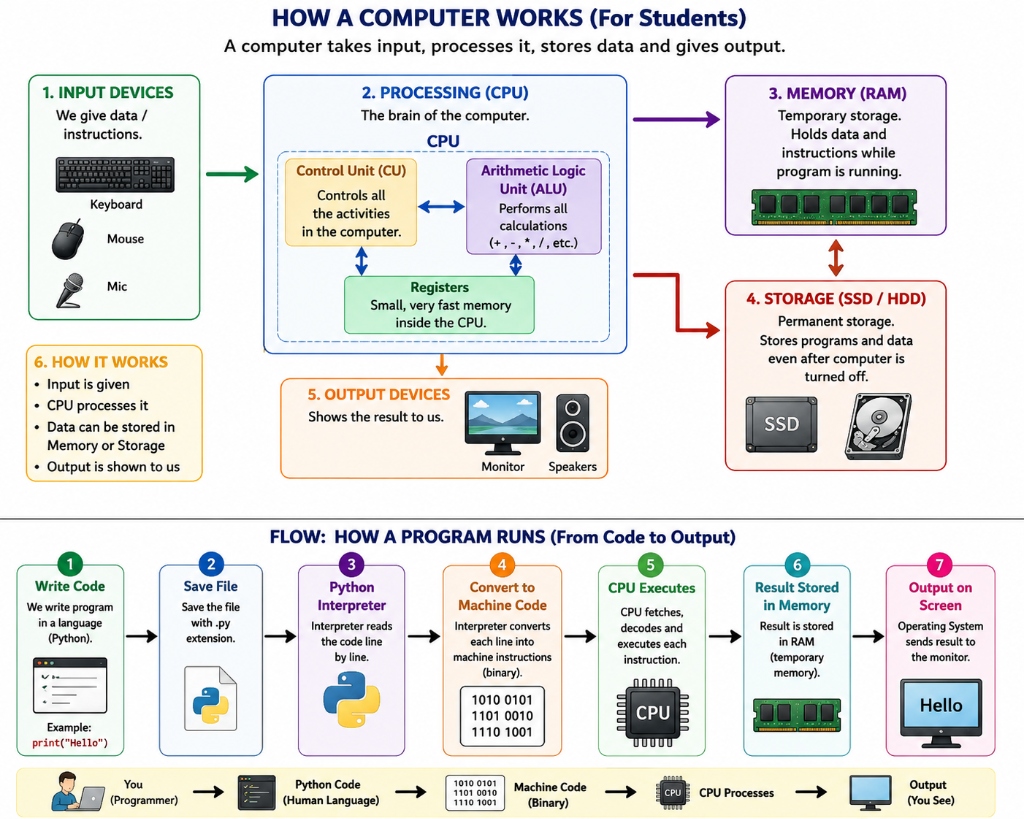
Components of a Computer System
| Component | Full Form / Type | Function in Computer System |
|---|---|---|
| Input Devices | Keyboard, Mouse, Mic | Receives commands, text, and data from the user |
| CPU | Central Processing Unit | The "brain" of the computer that processes all instructions |
| ↳ Control Unit (CU) | Internal CPU Unit | Directs and coordinates all hardware activities |
| ↳ ALU | Arithmetic Logic Unit | Performs calculations (+, -, *, /) and logical decisions |
| ↳ Registers | Fast Memory inside CPU | High-speed temporary locations holding current instructions |
| Memory | RAM (Random Access Memory) | Temporary volatile memory holding data while program is running |
| Storage | SSD / HDD | Permanent non-volatile storage saving files even when powered off |
| Output Devices | Monitor, Speakers, Printer | Displays results, audio, or output back to the user |
7 Steps: How a Python Program Runs
- Write Code: The programmer writes Python instructions in an editor (e.g.
print("Hello")). - Save File: The file is saved on permanent storage (SSD/HDD) with a
.pyextension. - Python Interpreter: When launched, the interpreter reads the
.pysource file line by line. - Process the Code: The Python interpreter checks and processes the code so the computer can run it.
- CPU Executes: The CPU fetches, decodes, and executes each binary instruction using its CU and ALU.
- Result Stored in Memory: Calculation results are temporarily held in RAM.
- Output on Screen: The Operating System sends the final result to the monitor screen (
Hello).
Without programming languages, every instruction — like calculating a bill or sending an email — would have to be typed manually in binary.
What Happens Without a Programming Language?
Imagine building a food delivery app using only binary 0s and 1s. It would take years, and finding mistakes would be almost impossible.
| Without a Programming Language | With a Programming Language |
|---|---|
Instructions are only 0s and 1s |
Instructions use clear words and keywords |
| Extremely slow and full of errors | Fast and easy to write |
| Impossible to read or fix errors | Easy to read, check, and update |
| Works on only one specific processor | Can often run on different computers with the right compiler, interpreter, or runtime |
| No reusable code modules | Can reuse code using functions and libraries |
| Cannot build large software systems | Can build large, complex applications |
NO PROGRAMMING LANGUAGE → BUILDING SOFTWARE IS NEARLY IMPOSSIBLE
What Becomes Possible With Programming Languages?
Programming languages allow us to turn ideas into software like mobile apps, websites, games, banking portals, and AI systems. For example, a food delivery company uses programs to:
- Take and verify customer orders
- Calculate item totals, discounts, and taxes
- Track delivery drivers on a map in real time
- Process online payments securely
- Recommend popular restaurants to users
- Send order updates and receipts
IDEA → PROGRAMMING LANGUAGE → WORKING SOFTWARE → REAL-WORLD IMPACT
Why Should We Learn Programming?
Programming is the skill of teaching a computer how to solve problems. Learning to program: - Improves logical thinking and problem-solving skills - Is useful in many fields like data analysis, automation, finance, and engineering - Opens up career opportunities in software development, data science, testing, and cloud operations
LEARN PROGRAMMING → SOLVE PROBLEMS WITH CODE → BUILD REAL SOFTWARE
History & Classification
A Short History of Programming Languages
As computer hardware improved, programming languages evolved to make writing programs easier for humans.
1940s  MACHINE CODE        → raw binary (0s and 1s)
1950s  ASSEMBLY LANGUAGE   → short codes (ADD, MOV, JMP)
1950s–60s  FORTRAN, COBOL  → first high-level languages, closer to English
1970s  C                   → structured programming, efficient and fast
1980s  C++                 → added Object-Oriented Programming (OOP)
1990s  Java, Python, JS    → portable, easy to use, huge feature libraries
2000s+ Go, Rust, Swift     → built for modern web, cloud, and mobile apps
Generations of Programming Languages
Programming languages are categorized into generations (GL) based on how close they are to machine hardware versus human language.
| Generation | Name | Example | How Close to Human Language |
|---|---|---|---|
| 1GL | Machine Language | Binary (0s and 1s) |
Closest to hardware |
| 2GL | Assembly Language | ADD, MOV, JMP |
Very low level |
| 3GL | High-Level Language | C, Java, Python | Easy to read, close to English |
| 4GL | Very High-Level Language | SQL | Focuses on what data is needed |
| 5GL | Goal-Based Language | Prolog | Focuses on goals or rules rather than step-by-step instructions |
1GL → 2GL → 3GL → 4GL → 5GL
CLOSER TO HARDWARE  ────────────────→  CLOSER TO HUMAN THOUGHT
Python is a 3rd generation language (3GL). It is easy to read while telling the computer step-by-step what to do.
Types of Programming Languages (Paradigms)
A programming paradigm is a style or way of writing code.
| Type | Core Idea | Example |
|---|---|---|
| Procedural | Step-by-step sequence of instructions | Running calculate_total() in order |
| Object-Oriented (OOP) | Models real things using objects (data + actions) | Creating Order, Customer, and Driver |
| Functional | Builds programs by combining small, reusable functions | Filtering a list of prices using functions |
| Scripting | Short scripts written to automate tasks quickly | A script that sends daily sales reports |
PROCEDURAL      → SEQUENCE OF STEPS
OBJECT-ORIENTED → REAL-WORLD OBJECTS
FUNCTIONAL      → REUSABLE FUNCTIONS
SCRIPTING       → QUICK AUTOMATION
Python supports all four styles, making it extremely flexible.
Popular Programming Languages
| Language | Primary Use Case |
|---|---|
| Python | Data science, Artificial Intelligence, Web development, Automation |
| Java | Large enterprise software, Android apps |
| C | Operating systems, embedded systems |
| C++ | Game engines, high-speed software |
| JavaScript | Web development (front-end and back-end) |
| SQL | Querying and managing database data |
| Go | Cloud services and server backends |
| Swift / Kotlin | iOS (Apple) and Android mobile apps |
Compiled vs Interpreted Languages
Programming languages translate code in one of two main ways:
| Compiled Language | Interpreted Language |
|---|---|
| Translates the entire code before running | Translates and runs code line by line |
Generates an .exe or binary file |
Needs an interpreter to run |
| Examples: C, C++ | Examples: Python, JavaScript |
| Syntax errors are found before creating the executable | Errors may appear when the interpreter reaches the problem line |
| Fast execution speed | Faster to write and test code |
COMPILED     → SOURCE CODE → FULL TRANSLATION → EXECUTABLE → RUN
INTERPRETED  → SOURCE CODE → INTERPRETER RUNS IT LINE BY LINE
Exam & Placement Tip
- Python is commonly called an interpreted language: The interpreter runs the program step by step. If a runtime error occurs on line 10, earlier lines may run before the program stops.
- C/C++ are compiled languages: The compiler checks the source code and creates an executable only if compilation succeeds. Runtime errors can still happen when the executable runs.
Programming Languages vs SQL
SQL (Structured Query Language) is used specifically for databases, whereas Python is a general-purpose programming language.
| Programming Language (e.g. Python) | SQL |
|---|---|
| General-purpose — builds full software systems | Special-purpose — manages database data |
| Tells the computer how to do a task step by step | Tells the computer what data to get |
| Has built-in loops, conditions, and functions | Used mainly to search, insert, or update data |
| Example: Calculate total bill for an order | Example: SELECT * FROM orders WHERE status='Confirmed' |
PYTHON → BUILDS APPLICATION LOGIC
SQL    → STORES AND GETS DATA FROM THE DATABASE
In a real app, Python runs the application while SQL fetches order details from a database.
Python vs C++ vs Java
print("Order Confirmed")
Output:
Order Confirmed
The same output in C++ or Java requires extra setup lines:
C++    →  #include <iostream>
           int main() {
               std::cout << "Order Confirmed";
               return 0;
           }

Java   →  public class Main {
               public static void main(String[] args) {
                   System.out.println("Order Confirmed");
               }
           }
| Feature | Python | C++ | Java |
|---|---|---|---|
| Type System | Dynamic (no data type declared) | Static (must declare data type) | Static (must declare data type) |
| Execution | Interpreted | Compiled to machine code | Compiled to bytecode (JVM) |
| Code Style | Simple and clean | Uses braces and symbols | Uses braces and extra classes |
| Beginner Friendliness | High | Moderate / Low | Moderate |
| Primary Use | AI, Data Science, Web, Automation | Game engines, high-speed software | Enterprise systems, Android |
PYTHON → EASY TO READ AND WRITE
C++    → HIGH SPEED AND HARDWARE CONTROL
JAVA   → PORTABLE ACROSS OPERATING SYSTEMS
Advantages and Disadvantages of Python, C++, and Java
| Language | Advantages | Disadvantages |
|---|---|---|
| Python | Easy to learn, clean code, huge library support | Slower execution speed than C/C++ |
| C++ | Very fast execution, full hardware memory control | Harder to learn, long complex code |
| Java | Portable ("write once, run anywhere"), secure | Requires extra setup code |
Why Python
Why Choose Python as Your First Language?
Python removes unnecessary syntax rules so you can focus on learning logic and problem-solving.
price = 200
quantity = 2
total = price * quantity
print(total)
Output:
400
Python lets you write and run code in just four simple lines.
| Advantage | Why It Helps Beginners |
|---|---|
| Simple English-like code | Focus on logic instead of complex symbols |
| No rigid variable type rules | Easy to write code without extra declarations |
| Huge standard library | Built-in tools for math, dates, files, and more |
| Large community | Easy to find solutions to any problem online |
| Multi-purpose | Learn one language for Web, Data, AI, and Automation |
SIMPLE SYNTAX + HUGE COMMUNITY → EASY LEARNING CURVE
Career Scope of Python
Python is widely used in many areas of software development.
| Job Role | What You Do |
|---|---|
| Data Analyst / Data Scientist | Analyze data and find business insights |
| Machine Learning / AI Engineer | Build smart predictive software |
| Web / Backend Developer | Build websites and server APIs |
| Automation Engineer | Write scripts to automate repetitive tasks |
| QA / Software Tester | Write automated scripts to test software |
| DevOps / Cloud Engineer | Automate cloud deployment systems |
ONE LANGUAGE → MANY JOB ROLES → HIGH DEMAND
Common Student Mistakes
| ✗ Mistake | ✓ Correct Understanding |
|---|---|
| Thinking a programming language is the computer | A language is just a tool to give instructions to a computer |
| Thinking one language is best for every single task | Different languages are good for different tasks |
| Ignoring compiled vs interpreted differences | This affects how errors appear and how fast code runs |
| Thinking SQL can replace Python | SQL manages database data; Python builds application logic |
| Thinking Python is too slow for real jobs | Python is used by major companies (Google, Netflix, YouTube) |
| Skipping basic concepts to learn advanced topics directly | Basics make advanced topics much easier to understand |
Placement Quick Points
PROGRAMMING LANGUAGE → BRIDGES HUMAN LOGIC AND MACHINE CODE
MACHINE CODE         → BINARY (1s AND 0s), NOT HUMAN-READABLE
COMPILER             → TRANSLATES ENTIRE CODE BEFORE RUNNING
INTERPRETER          → TRANSLATES AND RUNS CODE LINE BY LINE
1GL → 5GL            → FROM RAW BINARY TO GOAL-BASED LANGUAGES
PROCEDURAL           → STEP-BY-STEP INSTRUCTIONS
OOP                  → MODELS REAL-WORLD OBJECTS
FUNCTIONAL           → BUILDS SOFTWARE WITH REUSABLE FUNCTIONS
SCRIPTING            → QUICK TASK AUTOMATION
PYTHON               → INTERPRETED, DYNAMICALLY TYPED, HIGH-LEVEL
SQL                  → QUERIES AND MANAGES DATABASE DATA
PYTHON'S EDGE        → EASY TO READ + HUGE LIBRARIES + MANY JOB ROLES
Interview Questions
- What is a programming language?
- A set of instructions written by a human that a computer translates and executes.
- How does the human translator analogy explain how compilers and interpreters work?
- Just as a human translator translates Tamil to Chinese so two people can communicate, a compiler/interpreter translates human programming code (Python/Java) into machine binary code (
0s and1s) so computer hardware can execute it. - Why do programming languages exist?
- Computers only understand binary code (
0s and1s). Programming languages allow humans to write code in readable words. - What is machine code?
- Machine code is the low-level instruction form that a computer processor can execute directly.
- Why is binary code complex for humans?
- Binary requires converting everything into endless
0s and1s. It is unnatural for human minds, extremely hard to read, almost impossible to debug for small errors, and tied to specific hardware. - What is the difference between a compiler and an interpreter?
- A compiler translates the whole program before running it. An interpreter translates and runs the code line by line.
- Is Python compiled or interpreted?
- Python is commonly called an interpreted language. Its interpreter runs the program step by step.
- What are generations of programming languages?
- A classification (1GL to 5GL) based on how close a language is to machine code versus human language.
- Which generation does Python belong to?
- Python is a 3rd generation language (3GL).
- What is a programming paradigm?
- A style or approach to writing and organizing code (e.g., procedural, object-oriented, functional).
- What is the difference between Python and SQL?
- Python is a general-purpose programming language used to build software. SQL is used specifically to query and manage database data.
- What is the main difference between Python, C++, and Java?
- Python is simple and dynamically typed; C++ is compiled for maximum speed; Java runs on a virtual machine (JVM) for portability across platforms.
- Why is Python beginner-friendly?
- It uses simple syntax close to English, requires minimal setup code, and has huge community support.
Practice
- Explain in simple words what a programming language is.
- Explain the Language Translator Analogy (Tamil speaker, Chinese speaker, and Human Translator) and how it relates to Python and a Computer.
- Write down the steps to calculate a food delivery bill in plain English.
- Why can't a computer understand plain English directly?
- What is binary code, and why is writing programs directly in binary extremely complex for humans? Give 3 reasons.
- What is machine code and why don't programmers write code directly in machine code?
- List three problems if programming languages did not exist.
- List the 5 generations of programming languages in order (1GL to 5GL).
- Which generation does Python belong to?
- Give one example of procedural, object-oriented, functional, and scripting programming.
- Name 5 popular programming languages and one common use for each.
- Explain the difference between a compiler and an interpreter.
- Is Python compiled or interpreted? Explain.
- How is a programming language different from SQL?
- Compare Python, C++, and Java in terms of ease of learning and execution style.
- Give two advantages and one disadvantage of Python.
- Why is Python a great choice for beginners?
- Name three career paths you can choose after learning Python.
End of Level 0