
Control Flow
Level: 5 | Version: v1.0 | Author: Meptrasoft
Control flow decides which code runs and how many times. This module uses a Student Placement Eligibility System for conditionals and an E-commerce Order Processing System for loops.
Conditional Statements
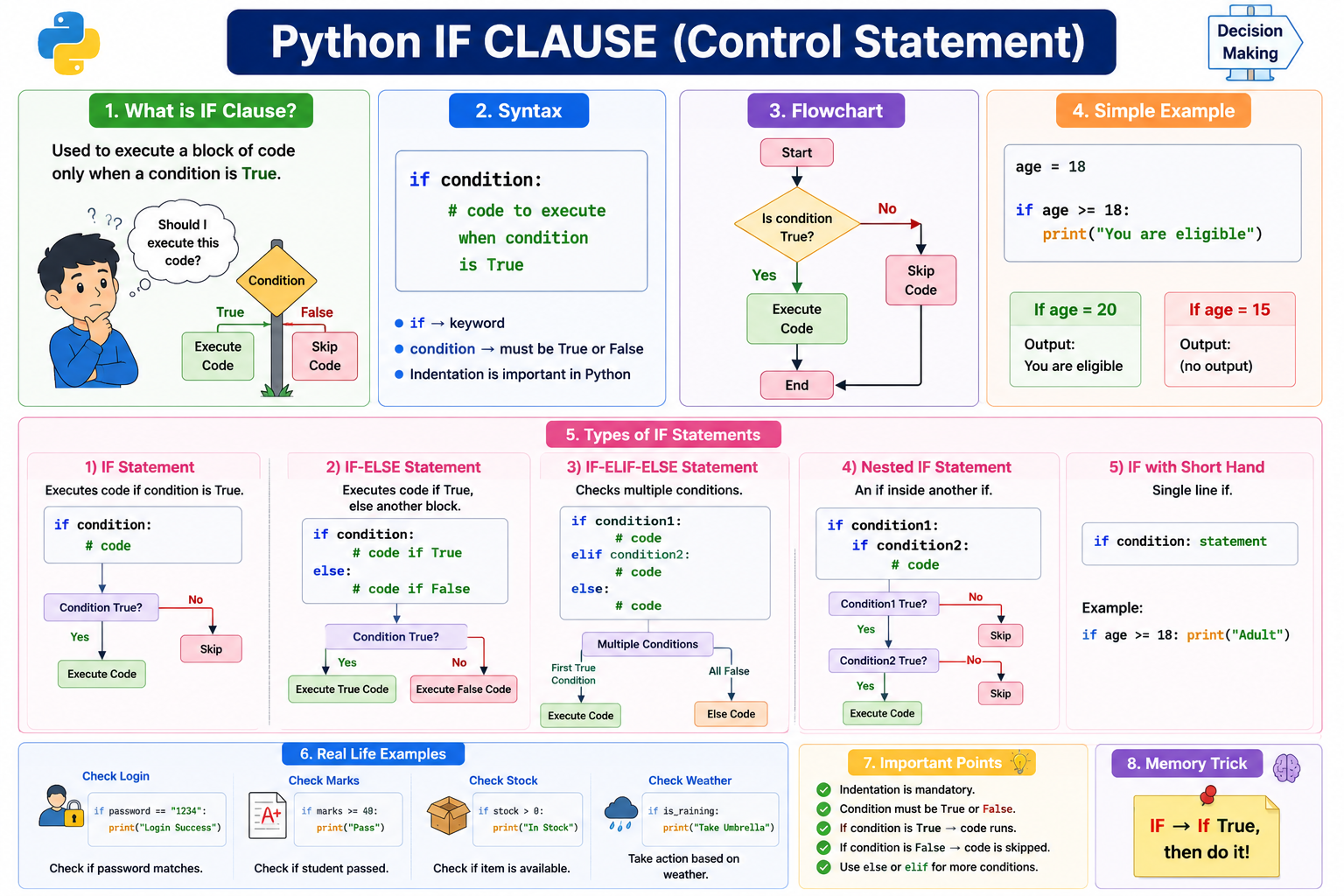
A conditional statement is used to make decisions in a program. It allows Python to execute different code based on a condition.
print(cgpa = 8.5)
print(cgpa)
if cgpa >= 7.0:
    print("Eligible for placement")
Output:
8.5
Eligible for placement
Why Do We Need Conditional Statements?
Real applications need to make decisions: Is a student eligible for placement? Is a user allowed to log in? Is a payment successful? Is a product in stock?
print(cgpa = 8.5)
The program needs to decide:
Output:
Is CGPA >= 7.0?
        ↓
   Yes or No?
Types of Conditional Statements
| Statement | Purpose |
|---|---|
if |
Execute code when a condition is true |
elif |
Check another condition |
else |
Execute when previous conditions are false |
| Nested Conditions | Condition inside another condition |
| Conditional Expression | Write a simple decision in one line |
We will use this data throughout the conditionals topic.
cgpa = 8.5
backlogs = 0
skills = ["Python", "SQL"]
is_placed = False
Truthy and Falsy Values
Before we use conditions, it helps to know that every value in Python is
either "truthy" or "falsy" when checked in a Boolean context (like an if).
A falsy value acts like False, and a truthy value acts like True.
Common falsy values include:
False      # the Boolean False
0          # integer zero
0.0        # float zero
""         # empty string
[]         # empty list
{}         # empty dictionary
()         # empty tuple
set()      # empty set
None       # the None object
Most other common values are truthy — non-zero numbers, non-empty strings, non-empty lists, and so on.
if []:
    print("runs")   # skipped: empty list is falsy

if [1]:
    print("runs")   # runs: non-empty list is truthy
You can check any value with bool(x):
print(bool([]))     # False
print(bool([1]))    # True
print(bool(0))      # False
print(bool("hi"))   # True
if Statement
The if statement executes a block of code only when a condition is truthy.
if condition:
    statement
Example:
cgpa = 8.5
if cgpa >= 7.0:
    print("Eligible for placement")
Output:
Eligible for placement
How Does if Work?
       cgpa >= 7.0
             ↓
        Is it True?
          /      \
       Yes        No
        ↓          ↓
 Execute code   Skip code
For cgpa = 8.5, the condition cgpa >= 7.0 is 8.5 >= 7.0 → True, so the
print runs.
What Happens When the Condition is False?
cgpa = 6.5
if cgpa >= 7.0:
    print("Eligible for placement")
No output, because 6.5 >= 7.0 → False and the if block is skipped.
Indentation is Important
Python uses indentation to identify the code inside a conditional block.
Correct:
cgpa = 6.5
if cgpa >= 7.0:
    print("Eligible")
Wrong (causes IndentationError):
if cgpa >= 7.0:
print("Eligible")
Output:
Condition ends with :
        ↓
Indented code belongs to the condition
Python commonly uses 4 spaces for indentation.
else Statement
The else statement executes when the if condition is false.
if condition:
    statement
else:
    statement
Placement example:
cgpa = 6.5
if cgpa >= 7.0:
    print("Eligible for placement")
else:
    print("Not eligible for placement")
Output:
Not eligible for placement
if vs else
| Statement | Meaning |
|---|---|
if |
Run when condition is truthy |
else |
Run when the if/elif chain reaches it with no earlier branch taken |
else does not have its own condition.
Wrong:
else cgpa < 7.0:
    print("Not Eligible")
elif Statement
elif means else if. It is used when we need to check multiple conditions in order.
if condition1:
    statement
elif condition2:
    statement
else:
    statement
Placement example — CGPA category:
cgpa = 8.5
if cgpa >= 9.0:
    print("Excellent")
elif cgpa >= 8.0:
    print("Very Good")
elif cgpa >= 7.0:
    print("Good")
else:
    print("Needs Improvement")
Output:
Very Good
First True Condition Wins
Python checks conditions from top to bottom. Once a condition is true, the
remaining elif/else blocks are skipped.
cgpa = 9.5
if cgpa >= 7.0:
    print("Good")
elif cgpa >= 8.0:
    print("Very Good")
elif cgpa >= 9.0:
    print("Excellent")
Output:
Good
Because 9.5 >= 7.0 → True, Python prints "Good" and stops. When checking
ranges, arrange conditions from the most specific/highest downward.
if / elif checks from TOP to BOTTOM
First matching condition wins
if vs elif vs else
| Statement | Has Condition? | Purpose |
|---|---|---|
if |
Yes | Check the first condition |
elif |
Yes | Check another condition if earlier branches failed |
else |
No | Run when no previous condition matched |
if   → CHECK FIRST
elif → CHECK ANOTHER
else → OTHERWISE
Multiple if vs if-elif
Multiple independent if statements are each checked separately.
cgpa = 9.5
if cgpa >= 7.0:
    print("Eligible")
if cgpa >= 8.0:
    print("Priority Candidate")
if cgpa >= 9.0:
    print("Top Candidate")
Output:
Eligible
Priority Candidate
Top Candidate
An if-elif chain stops after the first match.
cgpa = 9.5
if cgpa >= 9.0:
    print("Top Candidate")
elif cgpa >= 8.0:
    print("Priority Candidate")
elif cgpa >= 7.0:
    print("Eligible")
Output:
Top Candidate
Multiple if |
if-elif |
|---|---|
| Conditions are independent | Conditions belong to one decision chain |
| Multiple blocks can execute | Only one branch executes |
Every if is checked |
Stops after first matching branch |
| Use for multiple independent checks | Use for mutually exclusive choices |
Need MULTIPLE independent checks?  → Use multiple if
Need ONE result from many choices? → Use if-elif
Combining Conditions with Logical Operators
Conditions are often combined using and, or, and not.
Using and — a student must satisfy all requirements:
cgpa = 8.5
backlogs = 0
if cgpa >= 7.0 and backlogs == 0:
    print("Eligible for placement")
Using or — accept Python or Java developers:
skills = ["Python", "SQL"]
if "Python" in skills or "Java" in skills:
    print("Required programming skill available")
Using not — check whether a student is not already placed:
is_placed = False
if not is_placed:
    print("Available for placement")
Complete placement condition:
cgpa = 8.5
backlogs = 0
skills = ["Python", "SQL"]
is_placed = False
if (
    cgpa >= 7.0
    and backlogs == 0
    and "Python" in skills
    and not is_placed
):
    print("Eligible for placement")
else:
    print("Not eligible for placement")
Output:
Eligible for placement
Nested Conditions
A nested condition is an if statement inside another conditional block.
if condition1:
    if condition2:
        statement
Placement example:
cgpa = 8.5
backlogs = 1
if cgpa >= 7.0:
    if backlogs == 0:
        print("Eligible for placement")
    else:
        print("Not eligible due to backlogs")
else:
    print("Not eligible due to CGPA")
Output:
Not eligible due to backlogs
The inner condition is checked only when the outer condition allows entry into that block. Use nested conditions when the second decision depends on the first.
is_logged_in = True
is_admin = True
if is_logged_in:
    if is_admin:
        print("Show Admin Dashboard")
Nested if vs and
Use and when conditions are one simple combined decision:
age = 21
backlogs = 0
cgpa = 8.5
if cgpa >= 7.0 and backlogs == 0:
    print("Eligible")
Use nested conditions when the next check or action logically depends on the previous branch, especially for different messages at each stage:
age = 21
backlogs = 0
cgpa = 8.5
if cgpa >= 7.0:
    print("CGPA requirement passed")
    if backlogs == 0:
        print("Eligible")
    else:
        print("Backlog requirement failed")
else:
    print("CGPA requirement failed")
Avoid unnecessary deep nesting.
Output:
CGPA requirement passed
Eligible
Conditional Expressions
A conditional expression (ternary operator) writes a simple if-else
decision in one line.
value_if_true if condition else value_if_false
Normal if-else:
cgpa = 8.5
if cgpa >= 7.0:
    status = "Eligible"
else:
    status = "Not Eligible"
print(status)
Conditional expression:
cgpa = 8.5
status = "Eligible" if cgpa >= 7.0 else "Not Eligible"
print(status)
Output:
Eligible
Read it as:
TRUE VALUE if CONDITION else FALSE VALUE
Real-time examples:
is_placed = True
status = "Placed" if is_placed else "Not Placed"

number = 10
result = "Even" if number % 2 == 0 else "Odd"
Use it for simple two-result decisions. Avoid it for complex logic:
cgpa = 8.5
status = "Excellent" if cgpa >= 9 else "Good" if cgpa >= 7 else "Poor"
Prefer normal if-elif-else:
cgpa = 8.5
if cgpa >= 9:
    status = "Excellent"
elif cgpa >= 7:
    status = "Good"
else:
    status = "Poor"
print(status)
Output:
Good
Complete Placement Eligibility System
cgpa = 8.5
backlogs = 0
skills = ["Python", "SQL"]
is_placed = False
if cgpa >= 7.0:
    print("CGPA requirement passed")
    if backlogs == 0:
        print("Backlog requirement passed")
        if "Python" in skills:
            print("Skill requirement passed")
            if not is_placed:
                print("Eligible for placement")
            else:
                print("Already placed")
        else:
            print("Required skill missing")
    else:
        print("Backlog requirement failed")
else:
    print("CGPA requirement failed")
Cleaner version when only the final result matters:
age = 21
backlogs = 0
cgpa = 8.5
eligible = (
    cgpa >= 7.0
    and backlogs == 0
    and "Python" in skills
    and not is_placed
)
if eligible:
    print("Eligible for placement")
else:
    print("Not eligible for placement")
Output:
Need to know WHY the student failed? → Step-by-step conditions can help
Need only final eligibility?         → Use a clear combined condition
Common Fresher Mistakes — Conditions
| ✗ Mistake | Problem | ✓ Correct Understanding |
|---|---|---|
Missing : |
Invalid syntax | Add : after the condition |
| No indentation | Python cannot identify the block | Indent the block |
Using = in a condition |
= is assignment |
Use == for equality |
Wrong elif order |
Earlier broad condition matches first | Order ranges carefully |
Thinking every if is part of one chain |
Separate if statements are independent |
Use elif for one decision chain |
Adding a condition after else |
else has no condition |
Use elif |
| Deep unnecessary nesting | Code becomes difficult to read | Combine simple conditions |
| Using ternary for complex logic | Reduces readability | Use normal if-elif-else |
| Forgetting first true branch wins | Later elif branches are skipped |
Check top-to-bottom order |
Placement Quick Points — Conditions
- Conditional statements are used for decision-making.
ifchecks a condition;elifchecks another if earlier branches did not execute;elsehandles the rest.- Conditions are evaluated using truthiness.
- Python uses indentation to define code blocks.
ifandelifconditions are checked from top to bottom; the first matching branch executes.- Multiple independent
ifstatements can execute multiple blocks. - Use multiple
iffor independent checks; useif-eliffor mutually exclusive choices. - Nested conditions place one decision inside another; use them for dependent step-by-step decisions.
- Use logical operators to combine simple conditions.
- A conditional expression writes a simple
if-elsein one expression; avoid complex nesting of it.
Interview Questions — Conditions
- What is a conditional statement?
- A conditional statement is used to make decisions based on conditions.
- What is the purpose of
if? - It executes code when a condition is truthy.
- What is
elif? - It checks another condition when previous branches in the same chain did not execute.
- Does
elsehave a condition? - No.
- What happens after an
iforelifcondition matches? - That branch executes, and the remaining branches in the same chain are skipped.
- What is the difference between multiple
ifstatements andif-elif? - Multiple
ifstatements are independent and multiple blocks may execute. In anif-elifchain, only the first matching branch executes. - Why is indentation important in Python?
- Indentation defines code blocks.
- What is a nested condition?
- A conditional statement inside another conditional block.
- When should nested conditions be used?
- When a later decision logically depends on an earlier branch or needs step-by-step handling.
- What is a conditional expression?
- A one-line expression used for a simple
if-elsedecision:value_if_true if condition else value_if_false. - What is the difference between
=and==? =assigns a value.==compares values.- Why is the order of
elifconditions important? - Because conditions are checked from top to bottom and the first matching branch executes.
Practice — Conditions
Use:
cgpa = 8.5
backlogs = 0
skills = ["Python", "SQL"]
is_placed = False
- Check whether the student's CGPA is at least
7.0. - Print
"Eligible"or"Not Eligible"usingif-else. - Create CGPA categories using
if-elif-else. - Check CGPA and backlog requirements using
and. - Check whether the student knows
"Python"or"Java". - Check whether the student is not already placed.
- Create a nested condition for CGPA and backlogs.
- Rewrite the nested condition using
and. - Create a conditional expression for
"Placed"or"Not Placed". - Create a conditional expression to check even or odd.
- Explain why only one branch executes:
cgpa = 9.5
if cgpa >= 9.0:
    print("Excellent")
elif cgpa >= 8.0:
    print("Very Good")
elif cgpa >= 7.0:
    print("Good")
- Predict the output:
cgpa = 9.5
if cgpa >= 7.0:
    print("Eligible")
if cgpa >= 8.0:
    print("Priority")
if cgpa >= 9.0:
    print("Top Candidate")
- Find the mistake:
if cgpa >= 7.0
    print("Eligible")
- Find the mistake:
if cgpa = 7.0:
    print("Eligible")
- Explain the difference between two separate
ifstatements and anif/elifchain.
Loops
A loop executes a block of code repeatedly.
Without a loop:
print("Process Order 1")
print("Process Order 2")
print("Process Order 3")
With a loop:
orders = ["ORD101", "ORD102", "ORD103"]
for order in orders:
    print("Processing:", order)
Why Do We Need Loops?
Real applications process large amounts of data — thousands of orders, emails to
many users, file records, API responses. Imagine 10,000 orders; we cannot write
process(order1) 10,000 times. Instead:
orders = ["ORD101", "ORD102", "ORD103"]
for order in orders:
    process(order)
Types of Loops in Python
| Loop | Purpose |
|---|---|
for |
Process items |
while |
Repeat based on a condition |
Output:
for   → PROCESS ITEMS
while → REPEAT BASED ON CONDITION
Throughout the loops topic, we use an E-commerce Order Processing System.
orders = ["ORD101", "ORD102", "ORD103"]
for Loop
A for loop processes items from an iterable one by one.
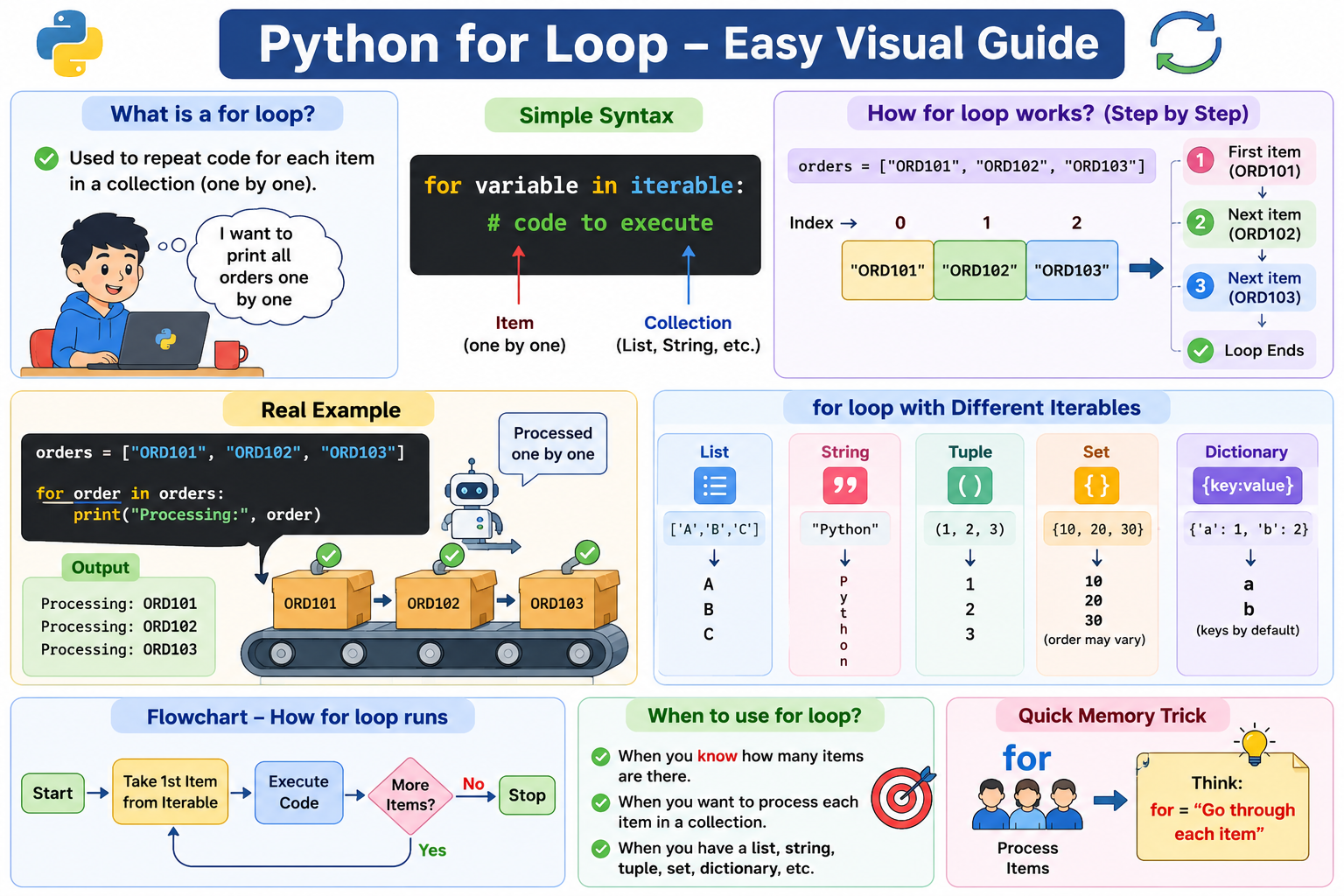
for variable in iterable:
    statement
Example — process orders:
orders = ["ORD101", "ORD102", "ORD103"]
for order in orders:
    print("Processing:", order)
Output:
Processing: ORD101
Processing: ORD102
Processing: ORD103
How Does a for Loop Work?
orders = ["ORD101", "ORD102", "ORD103"]
1st Iteration → order = "ORD101"
2nd Iteration → order = "ORD102"
3rd Iteration → order = "ORD103"
                     ↓
                  Loop Ends
Here orders is the iterable and order is the loop variable, which stores
the current item during each iteration. One complete execution of the loop block
is called an iteration.
for Loop with Different Iterables
A for loop works with strings, lists, tuples, sets, dictionaries, and range().
order_id = "ORD101"
for character in order_id:
    print(character)
statuses = ("Pending", "Paid", "Shipped")
for status in statuses:
    print(status)
categories = {"Laptop", "Mobile", "Books"}
for category in categories:
    print(category)
The iteration order of a set is not guaranteed.
Dictionary iteration processes keys by default:
order = {"id": "ORD101", "amount": 1500, "status": "Paid"}
for key in order:
    print(key)

for value in order.values():
    print(value)

for key, value in order.items():
    print(key, value)
Output:
id
amount
status
ORD101
1500
Paid
id ORD101
amount 1500
status Paid
while Loop
A while loop repeatedly executes code while a condition is truthy.
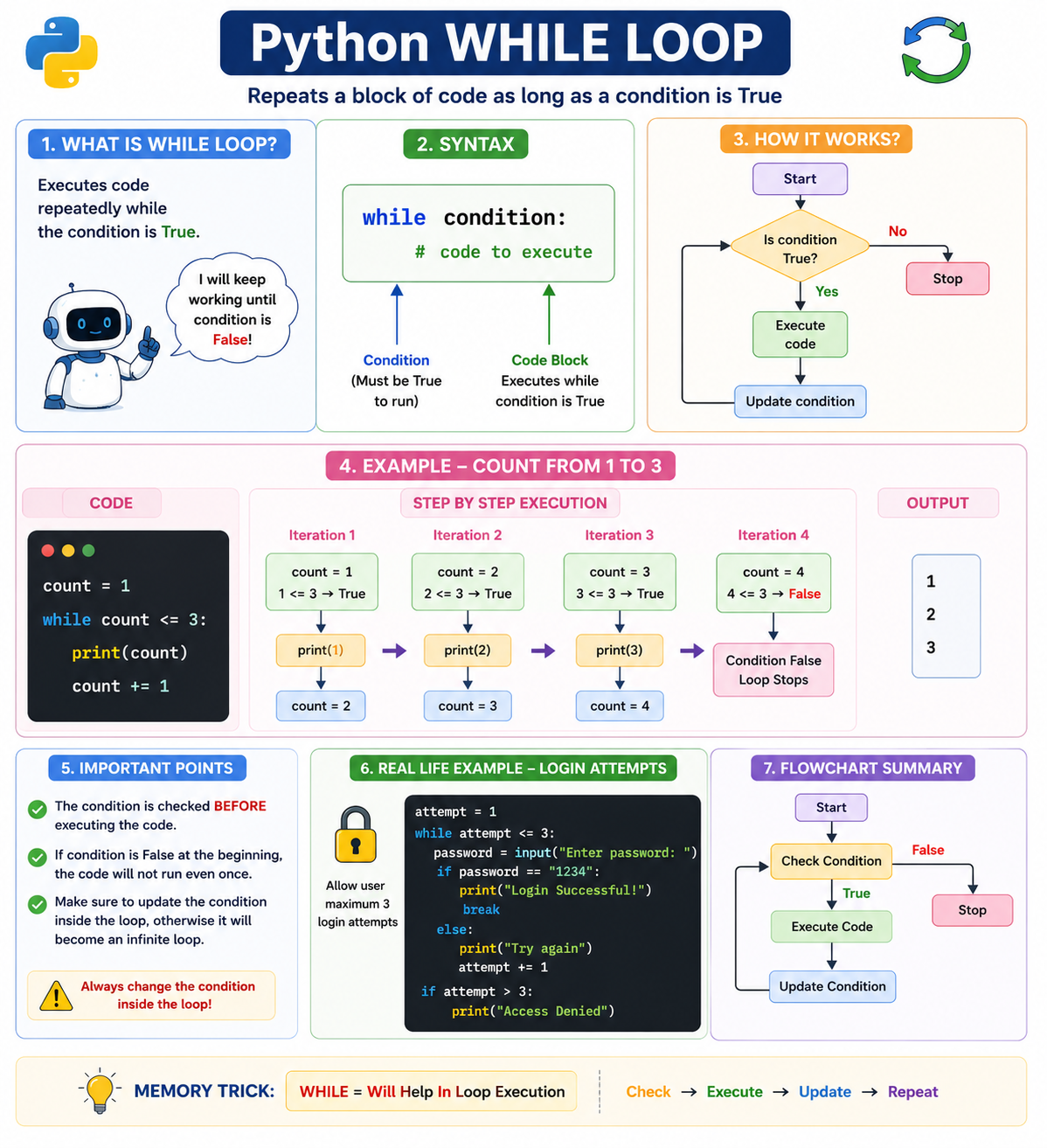
while condition:
    statement
Real-time example — payment retry (max three attempts):
attempt = 1
while attempt <= 3:
    print("Payment Attempt:", attempt)
attempt += 1
Output:
Payment Attempt: 1
Payment Attempt: 2
Payment Attempt: 3
attempt = 1 → True  → Execute
attempt = 2 → True  → Execute
attempt = 3 → True  → Execute
attempt = 4 → False → Stop
Infinite Loop
A loop that never stops is an infinite loop.
Good question. This is something every online code runner needs to handle.
If a user clicks Run and the code has an infinite loop, the program will never finish unless you stop it.
Example
while True:
    print("Hello")
This keeps printing forever.
Or:
i = 1
while i <= 10:
    print(i)
    # Forgot: i += 1
Since i never changes, the loop never ends.
What happens if you don't prevent it?
- ❌ Browser becomes slow or freezes.
- ❌ CPU usage goes very high.
- ❌ Memory keeps increasing.
- ❌ The Run button never finishes.
- ❌ User has to refresh the page.
How to prevent it?
1. Execution timeout (Best practice) ⭐
Stop the program automatically after a few seconds (e.g., 3–5 seconds).
Output:
Running...
⏱ Execution timed out after 5 seconds.
Possible infinite loop detected.
This is the most common solution.
2. Stop button
Provide a Stop button so users can manually interrupt execution.
[ Run ] [ Stop ]
3. Limit output
If the code prints too many lines, stop after a limit.
Example:
Maximum output limit (1000 lines) reached.
Execution stopped.
This prevents huge outputs from consuming memory.
4. Detect common infinite loops (Optional)
Before running, warn about obvious cases like:
while True:
or
while i < 10:
    # i never changes
This won't catch every case, but it can warn users.
Best setup for your Digital Notes
For your Pyodide-based Run button, we recommend:
- ✅ 5-second execution timeout.
- ✅ Stop button.
- ✅ Maximum output limit (1000 lines or 50 KB).
- ✅ Clear error message:
"Execution stopped because the program exceeded the time limit. Check for an infinite loop."
This combination gives users a good experience while protecting the browser from hanging or consuming excessive resources.
attempt = 1
while attempt <= 3:
    print("Retrying Payment")
attempt never changes, so 1 <= 3 is always true. When using while, make
sure the loop state changes:
attempt += 1
Realistic retry with an exit:
attempt = 1
max_attempts = 3
payment_success = False
while attempt <= max_attempts:
    print("Trying payment:", attempt)
    if payment_success:
        print("Payment Successful")
        break
    attempt += 1
Output:
Need to REPEAT BASED ON CONDITION? → while
for vs while
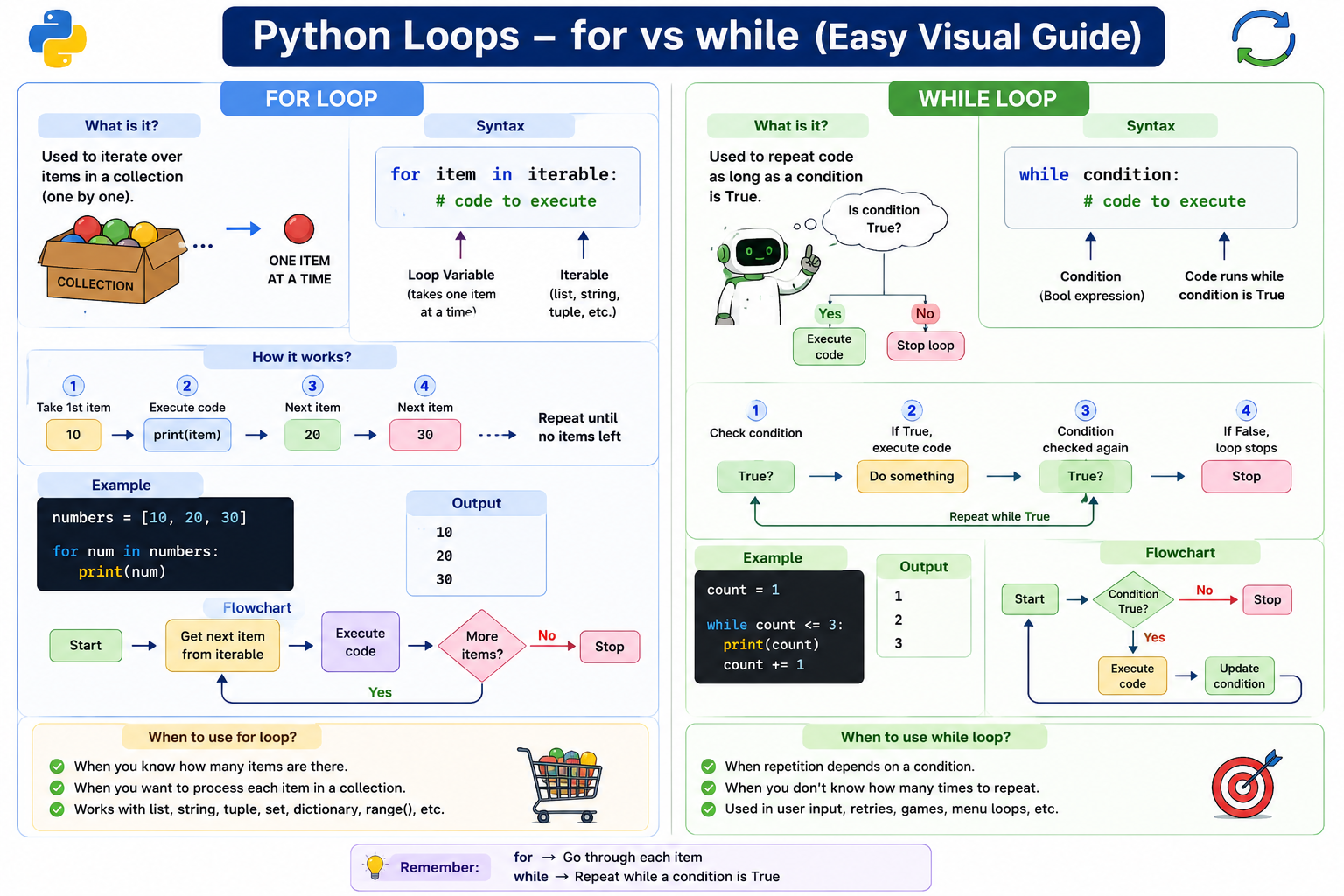
for |
while |
|---|---|
| Processes items | Repeats based on condition |
| Works with iterables | Works with Boolean conditions |
| Stops when iterable ends | Stops when condition becomes falsy |
| Common for collections | Common for retries and repeated checks |
PROCESS ITEMS            →  for
REPEAT BASED ON CONDITION → while
range()
range() generates a sequence of integers, commonly used with a for loop.
for number in range(5):
    print(number)
Output:
0
1
2
3
4
STOP VALUE IS EXCLUDED
range(start, stop):
for number in range(101, 105):
    print(number)   # 101 102 103 104
range(start, stop, step):
for number in range(0, 10, 2):
    print(number)   # 0 2 4 6 8
Output:
0
2
4
6
8
Real-time — generate order IDs:
for number in range(101, 106):
    print(f"ORD{number}")
Reverse with a negative step:
for seconds in range(5, 0, -1):
    print(seconds)   # 5 4 3 2 1
The step direction must match the movement. range(5, 1, 1) produces no
values because the step moves upward while the stop value is lower.
| Syntax | Meaning |
|---|---|
range(stop) |
0 to stop - 1 |
range(start, stop) |
start to stop - 1 |
range(start, stop, step) |
Generates values using a step |
Output:
5
4
3
2
1
Loop Control Statements
Some statements change the normal execution of a loop. pass is included here
because it is commonly used as a placeholder inside loop or conditional blocks.
| Statement | Purpose |
|---|---|
break |
Stop the loop |
continue |
Skip current iteration |
pass |
Do nothing |
break
break immediately stops the nearest enclosing loop.
Real-time example — fraud detection:
orders = ["ORD101", "ORD102", "FRAUD", "ORD104"]
for order in orders:
    if order == "FRAUD":
        print("Fraud Detected")
        break
    print("Processing:", order)
Output:
Processing: ORD101
Processing: ORD102
Fraud Detected
ORD104 is not processed.
break → STOP THE LOOP
Common uses: stop when fraud is detected, after payment success, when a search result is found, after valid input, or to exit a menu.
continue
continue skips the rest of the current iteration and moves to the next.
Real-time example — skip cancelled orders:
orders = [
    ("ORD101", "Paid"),
    ("ORD102", "Cancelled"),
    ("ORD103", "Paid")
]
for order_id, status in orders:
    if status == "Cancelled":
        continue
    print("Processing:", order_id)
Output:
Processing: ORD101
Processing: ORD103
The loop does not stop; only the current iteration is skipped.
continue → SKIP CURRENT ITERATION
break vs continue
break |
continue |
|---|---|
| Stops the entire loop | Skips one iteration |
| Loop ends | Loop continues |
| No next iteration | Moves to next iteration |
break    → STOP
continue → SKIP
pass
pass is a statement that does nothing. It is used as a placeholder when
Python requires a statement but the logic is not implemented yet.
if True:
    pass
Real-time — future refund feature:
order_status = "Refunded"
if order_status == "Refunded":
    pass
pass inside a function:
def process_refund():
print(pass)
Important fresher correction — pass does not skip; it does nothing.
Output:
continue → SKIP CURRENT ITERATION
pass     → DO NOTHING
pass does not stop the loop, skip the iteration, or return a value.
break vs continue vs pass
| Statement | Meaning |
|---|---|
break |
Stop the loop |
continue |
Skip current iteration |
pass |
Do nothing |
break    → STOP
continue → SKIP
pass     → DO NOTHING
Pattern Matching
match-case
match-case is Python's structural pattern matching feature, introduced in
Python 3.10. For beginners, it can be understood as switch-style routing.
match value:
    case pattern1:
        statement
    case pattern2:
        statement
    case _:
        statement
Real-time example — order status processing:
order_status = "Shipped"
match order_status:
    case "Pending":
        print("Waiting for Payment")
    case "Paid":
        print("Prepare the Order")
    case "Shipped":
        print("Order is on the Way")
    case "Delivered":
        print("Order Completed")
    case "Cancelled":
        print("Order Cancelled")
    case _:
        print("Unknown Order Status")
Output:
Order is on the Way
_ is a wildcard pattern that matches the remaining cases (acts like a
default in simple examples).
if-elif vs match-case
if-elif |
match-case |
|---|---|
| Flexible conditions | Pattern matching |
| Range comparisons | Known patterns |
| Complex Boolean logic | Structural matching |
amount > 5000 |
case "Paid" |
COMPLEX BOOLEAN / RANGE CONDITIONS  →  if-elif
PATTERN-BASED MATCHING              →  match-case
match-case is More Than switch
Do not permanently remember match-case = switch. Correct understanding:
match-case → Structural Pattern Matching.
order = ("Paid", 5000)
match order:
    case ("Paid", amount):
        print("Paid Amount:", amount)
    case ("Cancelled", _):
        print("Order Cancelled")
Python matches the structure of the tuple. Beginner view: switch-style routing. Interview view: structural pattern matching.
Complete E-commerce Order Processing Example
orders = [
    ("ORD101", "Paid"),
    ("ORD102", "Cancelled"),
    ("ORD103", "Shipped"),
    ("ORD104", "Fraud"),
    ("ORD105", "Delivered")
]
for order_id, status in orders:
    if status == "Cancelled":
        print(order_id, "Skipped")
        continue
    if status == "Fraud":
        print("Fraud Detected:", order_id)
        break
    match status:
        case "Paid":
            print(order_id, "→ Prepare Order")
        case "Shipped":
            print(order_id, "→ Track Delivery")
        case "Delivered":
            print(order_id, "→ Order Completed")
        case _:
            print(order_id, "→ Unknown Status")
Output:
ORD101 → Prepare Order
ORD102 Skipped
ORD103 → Track Delivery
Fraud Detected: ORD104
ORD105 is not processed because break stops the loop at ORD104. This
example combines for, continue, break, and match-case.
Most Important Loop Decision
Do I need to PROCESS ITEMS?               →  for
Do I need to REPEAT BASED ON A CONDITION? →  while
for order in orders:
    process(order)          # process orders → for

while attempt <= max_attempts:
    retry_payment()         # retry payment → while
Common Fresher Mistakes — Loops
| ✗ Mistake | ✓ Correct Understanding |
|---|---|
while condition never changes |
Can create an infinite loop |
Thinking range(5) includes 5 |
Stop value is excluded |
Confusing break and continue |
break stops, continue skips |
Thinking pass skips |
pass does nothing |
Using for only with lists |
for works with iterables |
| Expecting dictionary values by default | Dictionary iteration gives keys |
Wrong range() step direction |
May produce no values |
Using while for simple collection processing |
Prefer for |
Calling match-case only a switch |
It supports structural patterns |
| Forgetting Python version | match-case requires Python 3.10+ |
Placement Quick Revision — Loops
Output:
Loop       → Repeats a block of code
Iteration  → One execution of a loop block
for        → Process items
while      → Repeat based on condition
range()    → Generate integer sequence
break      → Stop the loop
continue   → Skip current iteration
pass       → Do nothing
match-case → Structural pattern matching
Interview Questions — Loops
- What is a loop?
- A loop repeatedly executes a block of code.
- What is an iteration?
- One execution of a loop block is called an iteration.
- What is the difference between
forandwhile? forprocesses items from an iterable.whilerepeats based on a condition.- When should you use
for? - When processing items from an iterable.
- When should you use
while? - When repetition depends on a condition.
- What is an infinite loop?
- A loop that never reaches its stopping condition.
- What does
range(5)generate? - Integers from
0to4. - Is the stop value included in
range()? - No.
- What is the difference between
breakandcontinue? breakstops the loop.continueskips the current iteration.- What does
passdo? - It does nothing and is commonly used as a placeholder.
- Does
passskip an iteration? - No.
- What does dictionary iteration process by default?
- Keys.
- How do you iterate through dictionary keys and values?
for key, value in data.items(): print(key, value).- When was
match-caseintroduced? - Python 3.10.
- What is
match-case? - Python's structural pattern matching feature.
- What does
case _mean? - It is a wildcard pattern that matches remaining cases.
Practice — Loops
Use:
orders = [
    ("ORD101", "Paid"),
    ("ORD102", "Cancelled"),
    ("ORD103", "Shipped"),
    ("ORD104", "Fraud"),
    ("ORD105", "Delivered")
]
- Print every order using a
forloop. - Generate
ORD101toORD105usingrange(). - Create a payment retry system with three attempts using
while. - Skip cancelled orders using
continue. - Stop processing when fraud is detected using
break. - Create an empty refund function using
pass. - Process order statuses using
match-case. - Explain
forvswhile. - Explain
breakvscontinue. - Explain
passvscontinue. - Predict the output of
range(5). - Predict the output of
range(1, 10, 2). - Predict the output of
range(5, 0, -1). - Find the infinite loop problem in a payment retry program.
- Create a complete order-processing system that skips cancelled orders, stops on fraud, processes paid orders, tracks shipped orders, and completes delivered orders.
End of Level 5