
Operators
Level: 2 | Version: v1.0 | Author: Meptrasoft
Operators let us calculate, compare, and combine values. This module uses a Student Placement Eligibility System as the running example.
What is an Operator?
An operator is a symbol or keyword used to perform an operation on values. Variable names can be used in expressions because they refer to values.
cgpa = 8.5
bonus = 0.5
final_cgpa = cgpa + bonus
print(final_cgpa)
Output:
9.0
Here, + is an operator. It performs addition.
What are Operands?
The values on which an operator performs an operation are called operands.
cgpa = 8.5
bonus = 0.5
print(cgpa + bonus)
Here:
cgpa→ Operand+→ Operatorbonus→ Operand
Output:
9.0
Why Do We Use Operators?
Operators are used to:
- Perform calculations
- Compare values
- Check conditions
- Combine multiple conditions
- Assign values
- Check membership
- Compare objects
Example:
cgpa = 8.5
print(cgpa >= 7.0)
Output:
True
This can be used to check whether a student meets a company's CGPA requirement.
Types of Operators in Python
| Operator Type | Purpose |
|---|---|
| Arithmetic | Perform mathematical calculations |
| Comparison | Compare two values |
| Assignment | Assign or update values |
| Logical | Combine conditions |
| Membership | Check whether a value exists |
| Identity | Compare object identity |
| Bitwise | Perform operations on binary values |
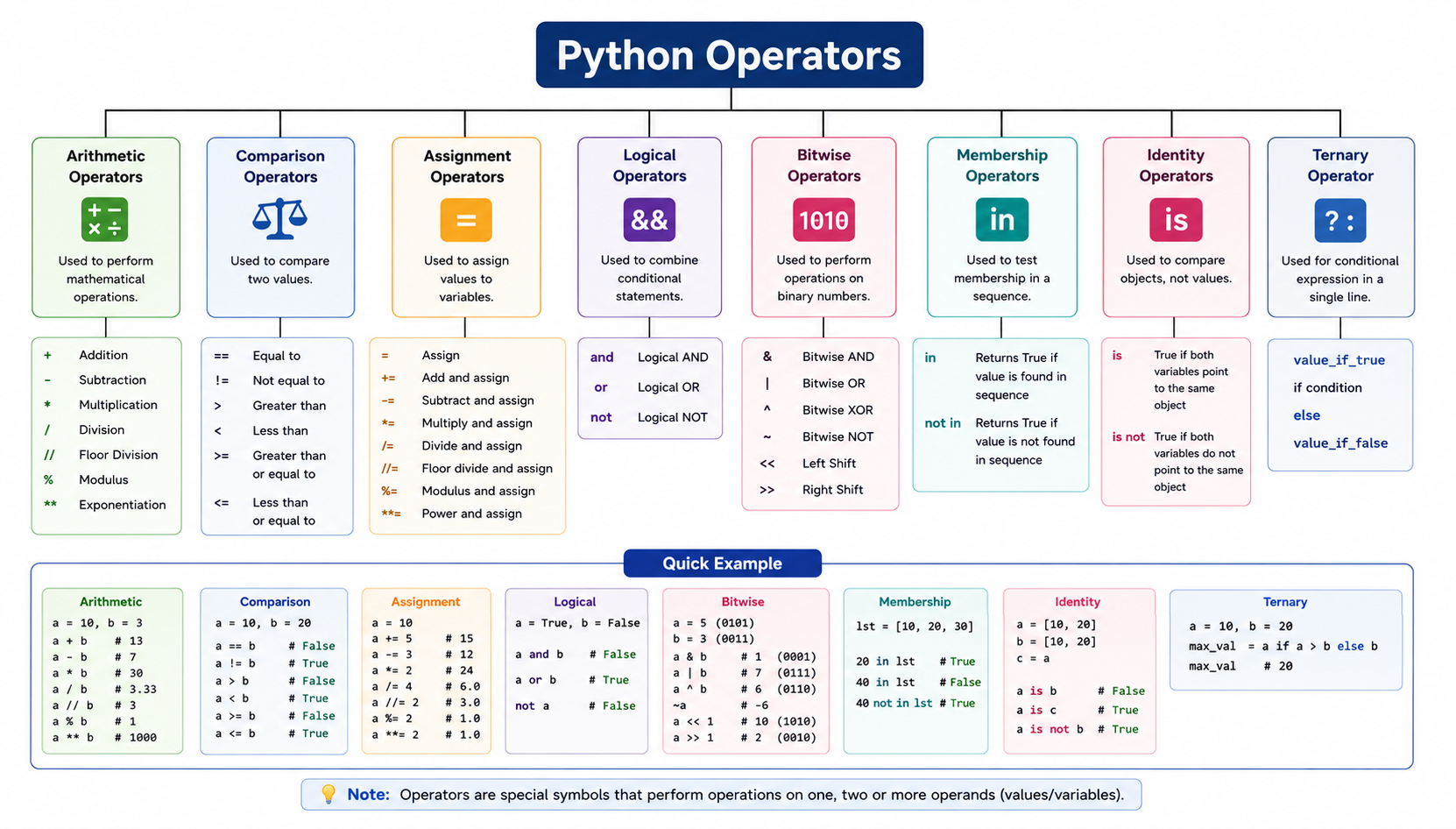
We will use this data throughout the topic.
cgpa = 8.5
age = 21
backlogs = 0
skills = ["Python", "SQL", "Java"]
is_placed = False
Arithmetic Operators
Arithmetic operators perform mathematical calculations.
| Operator | Name | Example |
|---|---|---|
+ |
Addition | 10 + 5 |
- |
Subtraction | 10 - 5 |
* |
Multiplication | 10 * 5 |
/ |
Division | 10 / 5 |
// |
Floor Division | 10 // 3 |
% |
Modulus | 10 % 3 |
** |
Exponentiation | 2 ** 3 |
Addition +
Adds two values.
cgpa = 8.0
bonus = 0.5
final_cgpa = cgpa + bonus
print(final_cgpa)
Output:
8.5
Subtraction -
Subtracts one value from another.
required_cgpa = 7.0
student_cgpa = 8.5
difference = student_cgpa - required_cgpa
print(difference)
Output:
1.5
Multiplication *
Multiplies values.
monthly_stipend = 15000
months = 6
total_stipend = monthly_stipend * months
print(total_stipend)
Output:
90000
Division /
Divides one value by another.
total_marks = 450
subjects = 5
total_marks = 450
total_marks = 450
average = total_marks / subjects
print(average)
Output:
90.0
Important
The / operator returns a float.
print(10 / 2)
Output:
5.0
Floor Division //
Returns the floor of the division result.
questions = 10
students = 3
questions_per_student = questions // students
print(questions_per_student)
Output:
3
10 / 3  → 3.333...
10 // 3 → 3
Important
Floor division rounds the result down toward negative infinity.
print(-10 // 3)
Output:
-4
It does not simply remove the decimal part.
Modulus %
Returns the remainder.
students = 10
team_size = 3
remaining_students = students % team_size
print(remaining_students)
Output:
1
Common Use — Even or Odd
student_id = 102
print(student_id % 2)
Output:
0
If:
number = 10
number = 10
number % 2 == 0 → Even
number % 2 != 0 → Odd
Exponentiation **
Raises a value to a power.
print(2 ** 3)
Output:
8
2³ = 2 × 2 × 2 = 8
Arithmetic Operator Quick Comparison
| Expression | Result |
|---|---|
10 + 3 |
13 |
10 - 3 |
7 |
10 * 3 |
30 |
10 / 3 |
3.333... |
10 // 3 |
3 |
10 % 3 |
1 |
10 ** 3 |
1000 |
Important: / vs // vs %
These three operators are based on division, but each answers a different question.
Let's use one real-world example:
students = 10
team_size = 3
We have 10 students. Each team can contain 3 students.
/ — Exact Division Result
Use / when you need the actual division result.
students = 10
team_size = 3
result = students / team_size
print(result)
Output:
3.3333333333333335
What Does It Mean?
Mathematically:
10 ÷ 3 = 3.333...
The / operator gives the division result.
When Do We Use /?
Use / when decimal values are meaningful.
Real-time examples:
- Average marks
- Percentage calculations
- Price calculations
- Speed
- Distance
- Salary averages
- Data analysis
Real-Time Example — Average Marks
total_marks = 450
subjects = 5
average = total_marks / subjects
print(average)
Output:
90.0
Easy Rule
Need the division result?
        ↓
       Use /
// — Complete Groups or Whole Units
Use // when you need the floor of the division result.
For positive counts, this often answers:
How many complete groups can be formed?
students = 10
team_size = 3
complete_teams = students // team_size
print(complete_teams)
Output:
3
Why?
Team 1 → 3 students
Team 2 → 3 students
Team 3 → 3 students
Used students → 9
Remaining     → 1
We can form only 3 complete teams of size 3.
When Do We Use //?
Common coding examples:
- Complete groups
- Full batches
- Full pages
- Complete boxes
- Time-unit conversion
- Row and column calculations
- Chunk calculations
Real-Time Example — Pagination
total_records = 95
records_per_page = 10
total_records = 95
total_records = 95
full_pages = total_records // records_per_page
print(full_pages)
Output:
9
There are 9 completely filled pages. One more partially filled page may still be required.
Real-Time Example — Convert Seconds to Minutes
print(total_seconds = 130)
print(total_seconds)
total_seconds = 130
total_seconds = 130
minutes = total_seconds // 60
print(minutes)
Output:
130
2
There are 2 complete minutes in 130 seconds.
Important Technical Point
// means floor division. It rounds the division result down toward negative infinity.
print(10 // 3)   # 3
print(-10 // 3)  # -4
So do not teach:
Output:
3
-4
That explanation is incorrect for negative values. Teach:
// gives the floor of the division result
Easy Rule
Need complete groups or whole units?
              ↓
             Use //
% — What is Left?
Use % when you need the remainder.
students = 10
team_size = 3
remaining_students = students % team_size
print(remaining_students)
Output:
1
Why?
10 students
↓
3 complete teams × 3 students = 9 students
↓
1 student remaining
The % operator tells us what is left after division.
When Do We Use %?
Common coding examples:
- Even or odd checking
- Remaining items
- Time conversion
- Cyclic rotation
- Alternating logic
- Index wrapping
- Divisibility checking
Real-Time Example — Even or Odd
number = 10
print(number % 2)
Output:
0
If a number is exactly divisible by 2, the remainder is 0.
number % 2 == 0
Means:
Output:
The number is even.
Example:
number = 10
if number % 2 == 0:
    print("Even")
else:
    print("Odd")
Real-Time Example — Remaining Seconds
total_seconds = 130
remaining_total_seconds = 130
total_seconds = 130
seconds = total_seconds % 60
print(remaining_seconds)
Output:
10
Why?
130 seconds
↓
2 complete minutes = 120 seconds
↓
10 seconds remaining
Easy Rule
Need to know what is left?
           ↓
          Use %
One Example — / vs // vs %
Use:
students = 10
team_size = 3
Now compare:
team_size = 3
students = 10
print(students / team_size)
print(students // team_size)
print(students % team_size)
Output:
3.3333333333333335
3
1
| Operator | Question It Answers | Result |
|---|---|---|
/ |
What is the division result? | 3.333... |
// |
What is the floor of the division result? | 3 |
% |
What is the remainder? | 1 |
Real-time meaning:
10 students ÷ 3 students per team
/  → Mathematical division result = 3.333...
// → Complete teams             = 3
%  → Students left             = 1
The Most Important Coding Connection
// and % are often used together.
Consider:
print(total_seconds = 130)
We want:
Output:
2 minutes 10 seconds
Code:
total_seconds = 130
minutes = total_seconds // 60
seconds = total_seconds % 60
print(minutes, "minutes")
print(seconds, "seconds")
Output:
2 minutes
10 seconds
How it works:
130 // 60 → 2 complete minutes
130 % 60  → 10 remaining seconds
This pattern appears frequently in coding.
// → Complete units
%  → Remaining units
Real-Time Example — Pagination
An application has:
total_records = 95
records_per_page = 10
Completely filled pages:
full_pages = total_records // records_per_page
print(full_pages)
Output:
9
Records on the final partial page:
records_per_page = 10
total_records = 95
remaining_records = total_records % records_per_page
print(remaining_records)
Output:
5
So:
9 full pages
5 records remaining
If the application must display all records, it needs 10 total pages. A common formula is:
records_per_page = 10
total_records = 95
total_pages = (total_records + records_per_page - 1) // records_per_page
print(total_pages)
Output:
10
For beginners, first understand:
// → Complete pages
%  → Remaining records
Then learn the total-page formula as a coding pattern.
Real-Time Example — Hours and Minutes
total_minutes = 135
hours = total_minutes // 60
minutes = total_minutes % 60
print(hours, "hours")
print(minutes, "minutes")
Output:
2 hours
15 minutes
How?
135 // 60 → 2 complete hours
135 % 60  → 15 remaining minutes
How to Choose the Correct Operator
Ask yourself one question.
Do I need the division result?
Yes → /
average = total_marks / subjects
Do I need the floor of the result, often representing complete units?
Output:
Yes → //
minutes = total_seconds // 60
Do I need the remainder or leftover?
Output:
Yes → %
seconds = total_seconds % 60
Permanent Memory Rule
Output:
/  → DIVISION RESULT
// → FLOOR / COMPLETE UNITS
%  → REMAINDER / LEFTOVER
Remember the team example:
10 Students
3 Students Per Team
10 / 3  → 3.333...  → Division result
10 // 3 → 3         → Complete teams
10 % 3  → 1         → Student left
If you remember this one example, you can remember all three operators.
Common Fresher Mistakes — / // %
| ✗ Wrong Understanding | ✓ Correct Understanding |
|---|---|
/ always gives an integer |
/ performs division and returns a float |
// removes decimals |
// performs floor division |
% means percentage |
% is the modulus operator and returns the remainder |
10 // 3 means rounded division |
It gives the floor of the division result |
// and % are unrelated |
They are often used together for complete units and leftovers |
95 // 10 gives total pages needed |
It gives full pages; a partial page may also be required |
Placement Quick Points — / // %
/performs division and returns a floating-point result.//performs floor division and rounds down toward negative infinity.%returns the remainder.- Use
/for averages and division results. //is often useful for complete groups or units.%is useful for leftovers and divisibility checks.//and%are commonly used together.number % 2 == 0checks whether a number is even.- Time conversion commonly uses
//and%. - Pagination logic often uses division-related operators.
Interview Questions — / // %
- What is the difference between
/and//? /performs division.//performs floor division.- What does
%return? - The remainder after division.
- What is the output of
10 / 3? - Approximately
3.333. - What is the output of
10 // 3? 3.- What is the output of
10 % 3? 1.- Why is
-10 // 3equal to-4? - Because floor division rounds down toward negative infinity.
- How do you check whether a number is even?
number % 2 == 0.- How do you convert seconds into minutes and remaining seconds?
minutes = total_seconds // 60andseconds = total_seconds % 60.- Which operator is used for average calculation?
/.- Which operator finds leftovers?
%.
Practice — / // %
- Find the result of
20 / 6. - Find the result of
20 // 6. - Find the result of
20 % 6. - Check whether
25is even or odd. - Find how many complete teams of
4can be created from18students. - Find how many students remain.
- Convert
150seconds into minutes and remaining seconds. - Convert
185minutes into hours and remaining minutes. - For
105records and10records per page, find the full pages and remaining records. - Explain why
-10 // 3returns-4.
Comparison Operators
Comparison operators compare two values. The result is always a Boolean value (True or False).
| Operator | Meaning |
|---|---|
== |
Equal to |
!= |
Not equal to |
> |
Greater than |
< |
Less than |
>= |
Greater than or equal to |
<= |
Less than or equal to |
Let's check placement eligibility.
cgpa = 8.5
required_cgpa = 7.0
Equal To ==
required_cgpa = 7.0
cgpa = 8.5
print(cgpa == required_cgpa)
Output:
False
Not Equal To !=
required_cgpa = 7.0
cgpa = 8.5
print(cgpa != required_cgpa)
Output:
True
Greater Than >
required_cgpa = 7.0
cgpa = 8.5
print(cgpa > required_cgpa)
Output:
True
Less Than <
required_cgpa = 7.0
cgpa = 8.5
print(cgpa < required_cgpa)
Output:
False
Greater Than or Equal To >=
required_cgpa = 7.0
cgpa = 8.5
print(cgpa >= required_cgpa)
Output:
True
Less Than or Equal To <=
backlogs = 0
print(backlogs <= 0)
Output:
True
= vs ==
This is one of the most common fresher mistakes.
| Operator | Purpose |
|---|---|
= |
Assignment |
== |
Comparison |
cgpa = 8.5
Assigns 8.5 to cgpa.
cgpa = 8.5
cgpa == 8.5
Checks whether cgpa is equal to 8.5.
Placement Favorite: Difference between = and ==.
Assignment Operators
Assignment operators assign or update values.
| Operator | Example | Same As |
|---|---|---|
= |
x = 10 |
Assign 10 |
+= |
x += 5 |
x = x + 5 |
-= |
x -= 5 |
x = x - 5 |
*= |
x *= 5 |
x = x * 5 |
/= |
x /= 5 |
x = x / 5 |
//= |
x //= 5 |
x = x // 5 |
%= |
x %= 5 |
x = x % 5 |
**= |
x **= 2 |
x = x ** 2 |
Assignment =
cgpa = 8.5
Addition Assignment +=
cgpa = 8.0
cgpa += 0.5
print(cgpa)
Output:
8.5
This is the same as:
cgpa = 8.0
cgpa = cgpa + 0.5
Subtraction Assignment -=
backlogs = 2
backlogs -= 1
print(backlogs)
Output:
1
Multiplication Assignment *=
stipend = 15000
stipend *= 2
print(stipend)
Output:
30000
Compound assignment operators make code shorter and cleaner.
Logical Operators
Logical operators combine or modify conditions.
| Operator | Meaning |
|---|---|
and |
Both conditions must be true |
or |
At least one condition must be true |
not |
Reverses the truth value |
Let's use placement eligibility.
cgpa = 8.5
backlogs = 0
skills = ["Python", "SQL", "Java"]
and
Returns True when both conditions are True.
backlogs = 0
cgpa = 8.5
print(cgpa >= 7.0 and backlogs == 0)
Output:
True
Visual understanding:
| Condition 1 | Condition 2 | and |
|---|---|---|
True |
True |
True |
True |
False |
False |
False |
True |
False |
False |
False |
False |
Placement Example
backlogs = 0
cgpa = 8.5
eligible = cgpa >= 7.0 and backlogs == 0
print(eligible)
The student is eligible only when both requirements are satisfied.
or
Returns True when at least one condition is True.
skills = ["Python", "SQL", "Java"]
print("Python" in skills or "Java" in skills)
Output:
True
Visual understanding:
| Condition 1 | Condition 2 | or |
|---|---|---|
True |
True |
True |
True |
False |
True |
False |
True |
True |
False |
False |
False |
Placement Example
A company accepts Python or Java developers.
skills = ["Python", "SQL", "Java"]
has_skill = "Python" in skills or "Java" in skills
print(has_skill)
At least one required skill is enough.
not
Reverses the truth value.
is_placed = False
print(not is_placed)
Output:
True
not True  → False
not False → True
Placement Example
is_placed = False
if not is_placed:
    print("Student is available for placement")
Logical Operator Quick Understanding
Output:
Student is available for placement
Membership Operators
Membership operators check whether a value exists in a collection.
| Operator | Meaning |
|---|---|
in |
Value exists |
not in |
Value does not exist |
Let's use student skills.
skills = ["Python", "SQL", "Java"]
in
skills = ["Python", "SQL", "Java"]
print("Python" in skills)
Output:
True
not in
skills = ["Python", "SQL", "Java"]
print("Git" not in skills)
Output:
True
Real-Time Placement Example
skills = ["Python", "SQL", "Java"]
required_skill = "Python"
eligible = required_skill in skills
print(eligible)
Membership operators are commonly used with strings, lists, tuples, sets, and dictionaries.
Membership with Dictionary
student = {
    "name": "Arun",
    "cgpa": 8.5
}
print("name" in student)
Output:
True
Important
For dictionaries, in checks keys by default.
student = {
print("Arun" in student)
Output:
False
To check values:
student = {
print("Arun" in student.values())
Output:
True
Identity Operators
Identity operators check whether two names refer to the same object.
| Operator | Meaning |
|---|---|
is |
Same object |
is not |
Different objects |
Consider:
skills = ["Python", "SQL"]
student_skills = skills
Both names refer to the same list.
student_skills = skills
skills = ["Python", "SQL"]
print(skills is student_skills)
Output:
True
Now create another list:
skills = ["Python", "SQL"]
required_skills = ["Python", "SQL"]
print(skills == required_skills)
print(skills is required_skills)
Output:
True
False
Why?
== → Same value?
is → Same object?
The lists contain the same values but are different objects.
== vs is
| Operator | Checks |
|---|---|
== |
Value equality |
is |
Object identity |
a = ["Python", "SQL"]
b = ["Python", "SQL"]
print(a == b)  # True
print(a is b)  # False
Placement Favorite: Difference between == and is.
Correct Use of is
is is commonly used with None.
result = None
print(result is None)
Recommended:
result = None
if result is None:
    print("No result available")
Avoid using is for normal value comparison.
age = 21
age is 21  # Avoid
Use:
age = 21
age == 21
Bitwise Operators
Bitwise operators perform operations on the binary representation of integers.
| Operator | Name |
|---|---|
& |
Bitwise AND |
\| |
Bitwise OR |
^ |
Bitwise XOR |
~ |
Bitwise NOT |
<< |
Left Shift |
>> |
Right Shift |
Consider:
a = 5
b = 3
print(b)
Binary values:
Output:
3
Bitwise AND &
print(5 & 3)
Binary:
Output:
1
Output:
1
Bitwise OR |
print(5 | 3)
Binary:
Output:
7
Output:
7
Bitwise XOR ^
Returns 1 when the bits are different.
print(5 ^ 3)
Binary:
Output:
6
Output:
6
Bitwise NOT ~
In Python:
~x = -(x + 1)
Example:
print(~5)
Output:
-6
Left Shift <<
Shifts bits to the left.
print(5 << 1)
Output:
10
For non-negative integers, shifting left by one position is equivalent to multiplying by 2.
5 << 1 → 10
Right Shift >>
Shifts bits to the right.
print(5 >> 1)
Output:
2
For non-negative integers, shifting right by one position behaves like floor division by 2.
5 >> 1 → 2
Real-Time Usage of Bitwise Operators
Bitwise operators are commonly seen in permission flags, low-level programming, networking, embedded systems, image processing, and binary data handling. For fresher placement preparation, understand the basic operation and output.
Operator Precedence
When multiple operators are used in one expression, Python follows an order of evaluation.
result = 10 + 5 * 2
print(result)
Output:
20
Why not 30? Multiplication happens before addition.
10 + 5 * 2
10 + 10
20
Using parentheses:
result = (10 + 5) * 2
print(result)
Output:
30
Simplified Precedence Order
| Priority | Operators |
|---|---|
| 1 | () |
| 2 | ** |
| 3 | Unary +, -, ~ |
| 4 | *, /, //, % |
| 5 | +, - |
| 6 | <<, >> |
| 7 | & |
| 8 | ^ |
| 9 | \| |
| 10 | Comparisons, in, is |
| 11 | not |
| 12 | and |
| 13 | or |
Beginner Rule
When an expression is difficult to understand, use parentheses.
backlogs = 0
cgpa = 8.5
eligible = (cgpa >= 7.0) and (backlogs == 0)
This makes the code easier to read.
Complete Placement Eligibility Example
cgpa = 8.5
age = 21
backlogs = 0
skills = ["Python", "SQL", "Java"]
is_placed = False

has_required_cgpa = cgpa >= 7.0
has_no_backlogs = backlogs == 0
has_required_skill = "Python" in skills
is_available = not is_placed

eligible = (
    has_required_cgpa
    and has_no_backlogs
    and has_required_skill
    and is_available
)

print("Placement Eligible:", eligible)
Output:
Placement Eligible: True
How it works:
cgpa >= 7.0        → True
backlogs == 0      → True
"Python" in skills → True
not is_placed      → True
True and True and True and True
                ↓
              True
This is how operators work together in real application logic.
Common Fresher Mistakes
| ✗ Mistake | Problem | ✓ Correct Understanding |
|---|---|---|
= used for comparison |
= is assignment |
Use == |
Confusing / and // |
They return different results | / division, // floor division |
Thinking % gives percentage |
% is modulus |
It returns the remainder |
Using and when one condition is enough |
and requires all conditions |
Use or for any condition |
Using or when all conditions are required |
One true condition is enough for or |
Use and |
Using is for value comparison |
is checks identity |
Use == |
"Arun" in student expecting dictionary value check |
in checks dictionary keys |
Use student.values() |
| Ignoring operator precedence | Output may differ | Use parentheses |
Thinking // simply removes decimals |
Incorrect for negative values | It floors the result |
Placement Quick Points
- Operators perform operations on values; values used with operators are called operands.
- Arithmetic operators perform calculations.
/performs division and returns a float.//performs floor division.%returns the remainder.**performs exponentiation.- Comparison operators return Boolean results.
=assigns a value;==compares values.andrequires all conditions to beTrue.orrequires at least one condition to beTrue.notreverses a Boolean condition.inandnot inare membership operators.ischecks object identity;==checks value equality.- Bitwise operators work with binary representations of integers.
- Parentheses improve expression clarity.
Interview Questions
- What is an operator?
- An operator is a symbol or keyword used to perform an operation on values.
- What is an operand?
- A value on which an operator performs an operation.
- What is the difference between
/and//? /performs division.//performs floor division.- What does
%return? - The remainder.
- What is the difference between
=and==? =assigns a value.==compares values.- What is the difference between
andandor? andrequires all conditions to beTrue.orrequires at least one condition to beTrue.- What does
notdo? - It reverses a Boolean condition.
- What is the difference between
inandnot in? inchecks whether a value exists.not inchecks whether it does not exist.- What is the difference between
==andis? ==compares values.iscompares object identity.- What does
10 % 3return? 1.- What does
2 ** 3return? 8.- What does
10 // 3return? 3.- What does
-10 // 3return? -4.- What does
incheck in a dictionary? - Dictionary keys by default.
- What is operator precedence?
- The order in which Python evaluates operators in an expression.
Practice
Use:
cgpa = 8.5
age = 21
backlogs = 0
skills = ["Python", "SQL", "Java"]
is_placed = False
- Check whether
cgpais greater than or equal to7.0. - Check whether the student has zero backlogs.
- Check whether
"Python"exists inskills. - Check whether
"Git"does not exist inskills. - Check whether the student is not placed.
- Combine CGPA and backlog conditions using
and. - Check whether the student knows
"Python"or"Java". - Increase
cgpaby0.5using an assignment operator. - Find the remainder when
10is divided by3(use the%operator). - Find the result of
2 ** 5. - Explain the difference between
/and//. - Explain the difference between
==andis. - Predict the output:
print(10 + 5 * 2)
- Predict the output:
print((10 + 5) * 2)
- Predict the output:
print(-10 // 3)
- Find the mistake:
age is 21
- Create a placement eligibility condition using CGPA
>= 7.0, zero backlogs,"Python"in skills, and student not already placed.
End of Level 2